メールタブではこのプラグインによって送信される電子メール のメッセージを管理します。このタブではオプションタブのプラグイン設定に基づいて使用されるメッセージのみが表示されるので注意することが重要です。
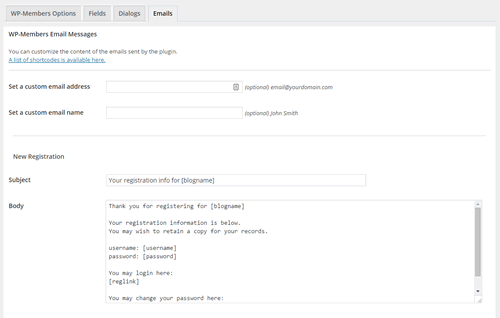
このタブではメールアドレスを設定してWordPress® が送信する既定のアドレス (wordpress@yourdomain.com) を変更することもできます。注意:これを行うためのプラグインまたはその他フィルターが既にある場合はこの設定を使用する必要はありません。
電子メールの内容はカスタマイズできます (むしろカスタマイズすることが期待されます)。電子メールの内容やカスタムフィールドに特化した様々なショートコードがあり、ショートコードを追加できます。
メール、メールの内容、メールの処理をカスタマイズするためのフィルターが多数あります。
HTML 形式の電子メールを送信する場合は、追加のドキュメントを参照してください。
メールの送信に問題がありますか? このプラグインはメールの送信に WordPressの wp_mail() 関数を使用します。通常は問題がプラグイン側または WordPress側 にある可能性はほとんどありません。しかし他にも考えられる要因はたくさんあります。電子メールの問題のトラブルシューティングの詳細については、FAQ のこの項目をご覧ください。
原文を見る
The Emails tab is where you would go to manage the email messages that are sent by the plugin. It is important to note that the only messages that are displayed in the tab are the ones that are used based on your plugin settings under the “Options” tab.
Under this tab, you may also set an email address to change the default address that WordPress® sends from (wordpress@yourdomain.com). Note: you do not need to use this setting if you already have a plugin or some other filter to do this.
Email content can be customized (and it is expected that you will customize it). There are a variety of shortcodes specifically for email content and custom fields and shortcodes can be added in.
There are a number of filters for customizing emails, their content, and the email process.
See additional documentation if you wish to send HTML formatted emails.
Having trouble with emails going out? The plugin uses the WordPress wp_mail() function for sending email. It is generally unlikely that the issue is the plugin or WordPress. But there are a lot of other possible factors. Check out this section of the FAQs for more information on troubleshooting email issues.