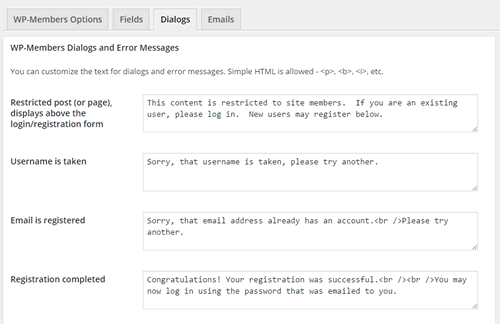
特定のユーザーダイアログ、登録エラーやログインエラーなどで表示されるエラーメッセージ、といったもののためにダイアログは用意されています。 これらのフィールドでは、<p> (段落)や<b> (太字)や<i>(斜体)などの簡単な HTMLタグの使用が許可されます。
原文を見る
Dialogs are included for certain user dialog and error messages that are displayed, such as empty registration fields, login error, etc. Simple HTML is allowed in these fields including <p> (paragraph), <b> (bold), <i> (italics), etc.
https://rocketgeek.com/plugins/wp-members/docs/plugin-settings/dialogs/
組み込みダイアログ
特にカスタマイズをしなくてもこのダイアログタブで組み込みダイアログを編集できます。これらには以下のメッセージが含まれています。:
- アクセス制限されたコンテンツ (アクセス制限されたページが表示された時にログインフォームの上に表示されます)
- ユーザー名使用済み (登録時のエラーメッセージ)
- メールアドレス登録済み (登録時のエラーメッセージ)
- 登録完了 (登録が成功すると表示されます)
- 登録情報の更新 (ユーザー登録データの更新が成功した場合に表示されます)
- パスワードの相違(パスワード変更時のエラーメッセージ)
- パスワードの変更 (パスワード変更が成功した場合に表示されます)
- パスワードリセットを実行時、ユーザー名もしくはメールアドレスが存在しない場合 (パスワードリセット時のエラー メッセージ)
- パスワードリセット (パスワードのリセットが成功すると表示されます)
原文を見る
You can customize any of the built in dialogs through the dialogs tab without customization. These include messages for the following:
- Restricted content (shows above the login form when a restricted page is viewed)
- Username is taken (registration error message)
- Email is registered (registration error message)
- Registration completed (shows upon successful registration)
- User update (shows upon success user registration data update)
- Passwords did not match (error message when changing a password)
- Password changes (shows on successful password change)
- Username or email do not exist when trying to reset forgotten password (error message for forgotten password reset)
- Password reset (shows on successful forgotten password reset)
カスタムダイアログ
上記に加えて、wpmem_add_custom_dialog() を使用してプラグインAPI を通じてカスタムダイアログを追加できます。この機能を使うとダイアログタブにカスタムダイアログが追加されます。プラグインの既定ダイアログの一部である既存のダイアログをこの画面に追加することで、それらを簡単に変更できるようになります。また独自のメッセージングを必要とするカスタムプロセスが実装されている場合は、それも追加できます。
(注意:wpmem_add_custom_dialog() で追加されたカスタムダイアログはwpmem_use_custom_dialog() で使用できます)。
原文を見る
In addition to the above, custom dialogs can be added through the plugin’s API using the wpmem_add_custom_dialog(). This function adds a custom dialog to the dialogs tab. Existing dialogs that are part of the plugin’s default dialogs can be added to this screen so that you can easily change them, or if a custom process is implemented that requires its own messaging, that can be added as well.
(Note: a custom dialog added with wpmem_add_custom_dialog() can be used with wpmem_use_custom_dialog()).
利用規約
TOS (利用規約) コンテンツを使用している場合は、このダイアログタブで TOS (利用規約) コンテンツを読み込むこともできます。これには <h1>, <h2>, <ul>, <li>,などのHTML も使用できます。
あるいは、利用規約ページを WordPress® ページとして設定しておりTOS リンクでそのページを開くようにしたい場合は、TOS ダイアログ ボックスに以下のショートコードを入力できます。:
[wpmem_tos url="http://mysite.com/my-tos-page"]
ショートコードの URL 値には、必ず WordPressTOS ページの完全な URL を入力してください。
このショートコードの詳細については、ショートコードのページを参照してください。
(プラグインの /templates/tos.php ファイルをテーマフォルダー内の /wp-members/templates/tos.php にコピーすることで、TOS ページのカスタムテンプレートを読み込むこともできます。カスタムテンプレートを使用する場合、HTMLを任意の方法でカスタマイズできます。 – テンプレートは完全なページとして読み込まれます。)
原文を見る
The Dialogs tab is also where you can load your TOS (Terms of Service) content, if you are using one. HTML is also allowed here, including <h1>, <h2>, <ul>, <li>, etc.
Alternatively, if you have set up a Terms of Service page as a WordPress® page and want the TOS link to open that page, you can enter the following shortcode into the TOS dialog box:
[wpmem_tos url=”http://mysite.com/my-tos-page”]
Be sure to put the full URL of your WP TOS page in the URL value of the shortcode.
See Page Shortcodes for more information on this shortcode.
(You can also load a custom template for the TOS page by copying the plugin’s /templates/tos.php file to /wp-members/templates/tos.php in your theme folder. When using a custom template, you can customize the HTML in any way you wish – the template is loaded as a complete page. )
多言語対応サイトのダイアログ
全てのダイアログの既定値はプラグインのコアオブジェクトクラスに含まれているため、翻訳ファイルの一部になります。多言語サイトを使用している場合は、各カスタムメッセージに対応したカスタム翻訳ファイルを使用する予定がなければこれらのダイアログを変更しないでください。gettext() による翻訳は完全に一致する文字列に対してのみ行われるため、ダイアログを変更すると翻訳ファイルに保存されている文字列と一致しなくなってしまいます。
原文を見る
The default values for all dialogs are included in the plugin’s core object class so that they will be part of the translation files. If you are using a multi-language site, you should not change any of these dialogs unless you plan to use custom translation files that match your custom messages. Translation through gettext() only occurs for strings that are an exact match, so once you change a dialog, it will no longer match what is stored in the translation file.