個々のメニュー項目の表示オプションを設定して、メニュー項目がログインユーザーに表示されるか、ログアウトユーザーに表示されるか、または全てのユーザーに表示されるかを指定できます。
定義済みのメンバーシップも使用している場合は、ログイン/ログアウトのオプションに加えて、各メンバーシップにどのメニュー項目を表示するかを設定できます。
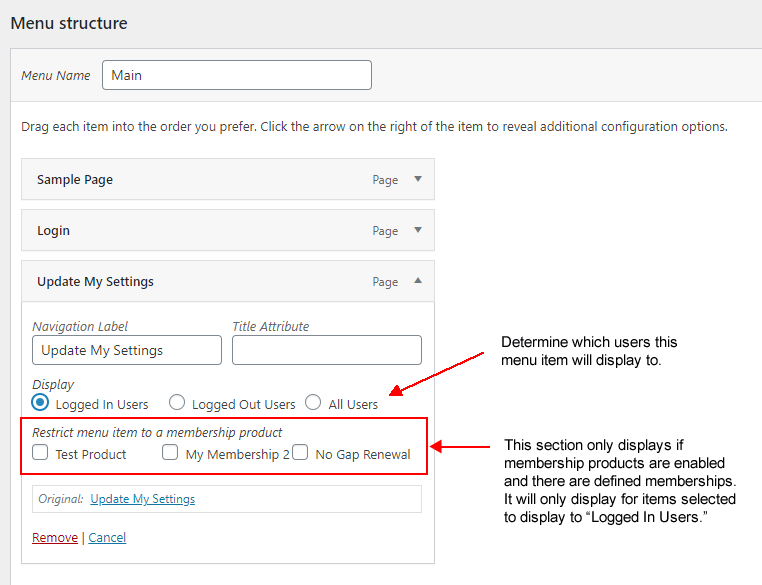
メニュー設定は、[外観 > メニュー] で個々のメニュー項目を編集する時に使用できます。 現時点ではカスタマイザーでメニュー項目を表示する場合にこれらは表示されません。
原文を見る
You can set display options for individual menu items to identify whether a menu item displays to a logged in user, logged out user, or all users.
If you are also using defined memberships, you can set which memberships a menu item may display to, in addition to logged-in/logged-out options.
Menu settings are available when editing individual menu items under Appearance > Menus. They do not currently display when viewing menu items in the Customizer.
https://rocketgeek.com/plugins/wp-members/docs/menus/individual-menu-item-settings/