ユーザーをエクスポートするにはいくつかの選択肢があります。
- 画面下部の一括操作の横にある 「すべてのユーザーをエクスポート」ボタンを使用して、すべてのユーザーをエクスポートできます。


- 一括メニューを使用して、一覧で選択したユーザーをエクスポートできます。いずれかのフィルタービューリンクを使用して、任意のユーザー群を選択して個別にエクスポートすることもできます。一括メニュー オプションを使用すると、選択された全てのユーザーが1つのCSVファイルにエクスポートされます。

一括メニュー操作を使用してエクスポートされたユーザーは、データベース内ではエクスポートされたものとして識別されます。「エクスポートされていません」フィルタービューを使用すると、以前にエクスポートされていないユーザーのフィルターされたビューを取得できます。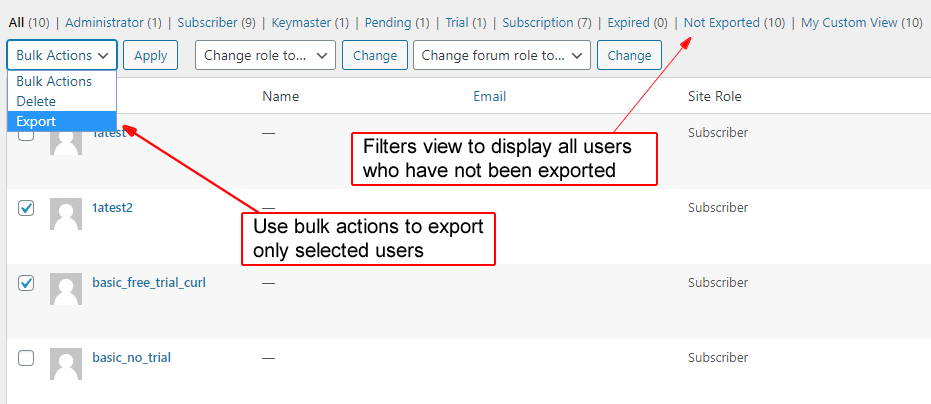
原文を見る
There are multiple options for exporting users.
https://rocketgeek.com/plugins/wp-members/docs/managing-users/export-users/
- You can export all users using the “Export All Users” button located next to the bulk actions at the bottom of the screen.
- You can use the bulk menu to export users you have selected in the list. You can use any of the filter view links and select any users to export individually. All users selected will be exported to a single CSV when using the bulk menu option.
Any users exported using the bulk menu action will be identified in the database as exported. You can get a filtered view of any users who have not been previously exported using the “not exported” filter view.