この機能は廃止されました。 代わりに個々のメニュー項目の状態を管理します。
ログインメニュー機能を使用すると、ログインまたはログアウトしたユーザーに表示する個別のメニューを作成できます。これはテーマ内の各メニュー領域のクローンを作成し、そのクローンがログインしているユーザー用であることを指定することによって動作します。
この機能には「設定」はありません。他のメニューと同様に編集できる、複製されたメニュー領域を作成するだけです。ただし、プラグインのオプション タブでこの機能を有効にする必要があります。
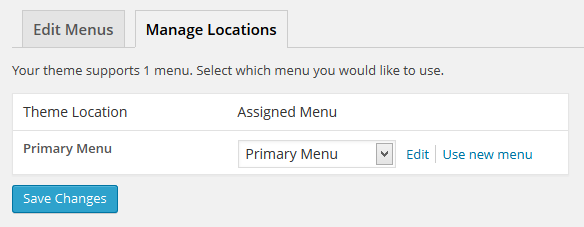
ログイン メニューを有効にする前だと、[外観 > メニュー > 位置を管理]画面は以下のようになっています。:
プラグインの オプションタブでメニューのクローン設定を有効にすると、テーマがサポートするメニューの場所のクローンが追加されることがわかるでしょう。これによりログインしているユーザーに対してどのメニューの位置でも異なるメニューを表示できます。
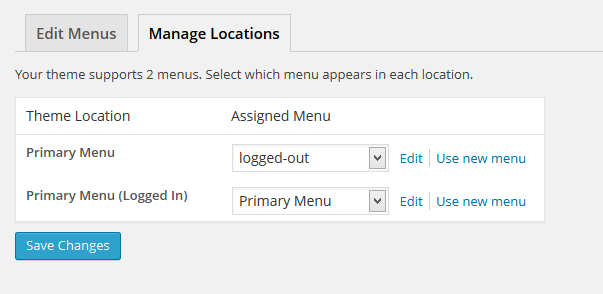
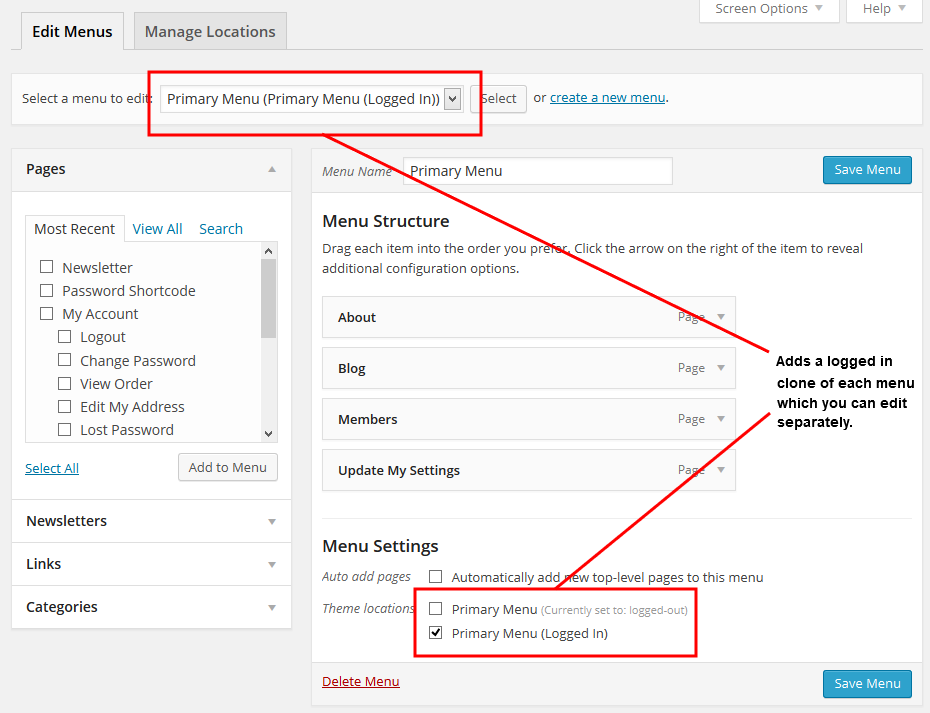
そして、これらのメニューの位置のいずれかにログイン状態とログアウト状態のメニューを設定できます。
原文を見る
This feature is obsolete. Manage the state of individual menu items instead.
Logged in menus allow you to create separate menus to display to logged in or logged out users. It works by creating a clone of each menu area in your theme and identifying the clone as being for logged in users.
There are no “settings” for this feature. It simply creates the cloned menu area which you can edit like any other menu. However, you do need to enable this feature in the plugin’s Options tab.
Prior to enabling logged in menus, here is what Appearance > Menus > Menu Locations will look like:
Once the Clone Menus setting is enabled in the plugin’s Options tab, you will see that it adds a clone of any menu location that your theme supports. This allows you to show a different menu to logged in users for any menu location.
You can then set up menus for logged in and logged out states for any of these menu locations.
https://rocketgeek.com/plugins/wp-members/docs/menus/logged-in-menus/