メンバーシップ機能を使用すると、ユーザーに特定の会員資格(メンバーシップ)が割り当てられているかどうかに基づいて投稿、固定ページ、その他のコンテンツへのアクセスを定義できます。
WP-Membersでは必要に応じて様々な用途に合わせた「メンバーシップ」をご用意しています。一般的に、これはコンテンツへのユーザーアクセスを割り当てるために使用できる定義タグと考えることができます。ユーザーが特定のメンバーシッププロダクトを所有している場合、そのメンバーシッププロダクトを必要とするように設定されたコンテンツにアクセスできます。
原文を見る
Membershipsgive you the ability to define access to posts, pages, and other content based on whether the user has been assigned a specific membership.
In WP-Members, “memberships” can fit a variety of applications based on your need. In general, you can think of it as a defining tag that you can use to assign a user access to content. If the user has a specific membership product they can access content set to require that membership product.
https://rocketgeek.com/plugins/wp-members/docs/membership-products/
メンバーシップを定義する
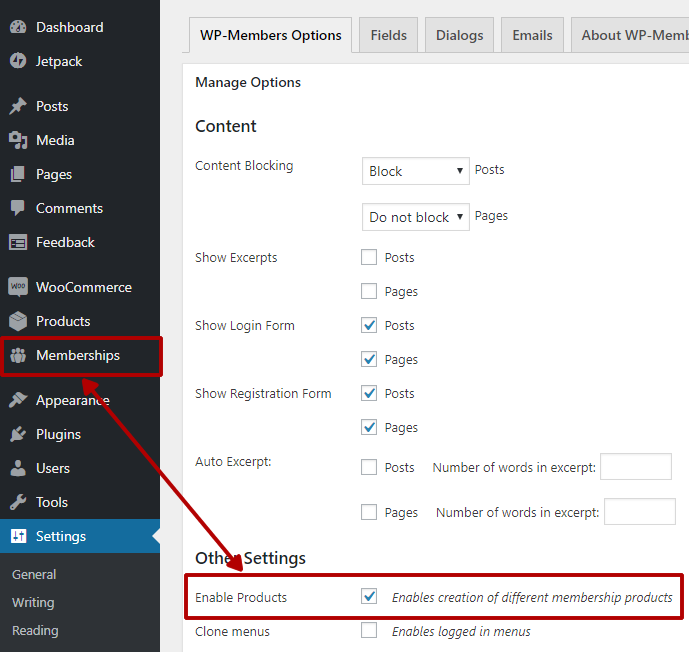
メンバーシップは「メンバーシップ」メニュー項目で作成および定義できます。このメニュー項目を表示するには、プラグインのメインの オプションタブでメンバーシップ機能を有効にする必要があります。
新しいメンバーシップの作成は、投稿の作成とよく似ています。 上部にある「新規追加」ボタンをクリックするだけです。
新規メンバーシップの場合はタイトルを入力するだけです。 スラッグはタイトルから自動的に作成されます。
さらなるドキュメントと利用可能なプロパティの詳細については、「メンバーシップのプロパティ」を参照してください。
「レベル」の設定方法に関するドキュメントについては、「メンバーシップのレベル」を参照してください。
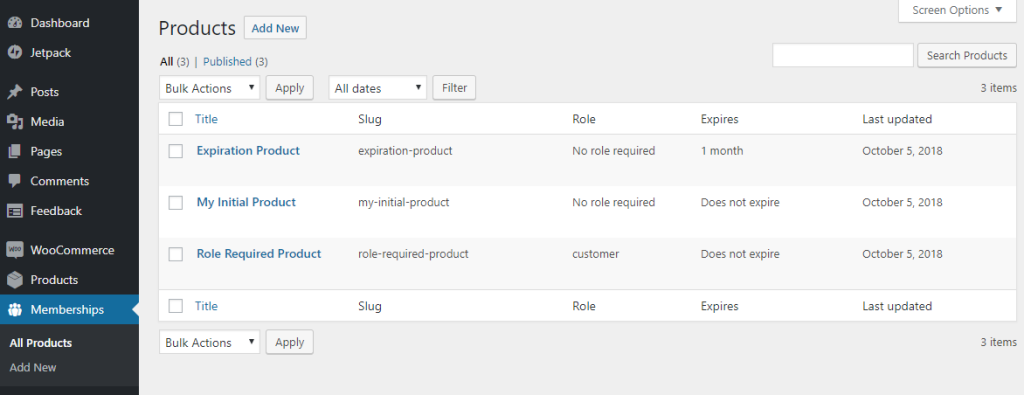
メンバーシップを編集するには、メンバーシップ表でタイトルをクリックします。メンバーシップを選択すると、メンバーシップ編集画面が表示されます (左のスクリーンショットを参照してください。これは編集時と同じ画面です)。
メンバーシップのスラッグは変更できないことに注意してください。
原文を見る
Memberships can be created and defined in the “Memberships” menu item. You’ll need to have memberships enabled on the plugin’s main Options tab for this menu item to display.
Creating a new membership is much like creating a post. Just click the “Add New” button at the top.
For a new membership, just enter a title. The slug will be created automatically from the title.
For additional documentation and detailed information on available properties, see Membership Properties.
For documentation on how to set up “levels,” see Membership Levels.
To edit a membership, click the title in the memberships table. Selecting a membership will bring you to the membership editor screen (see the screenshot for Add New Product – it is the same screen when editing).
Note that you cannot change the slug of a membership.
https://rocketgeek.com/plugins/wp-members/docs/membership-products/
メンバーシップをコンテンツへ割り当てる
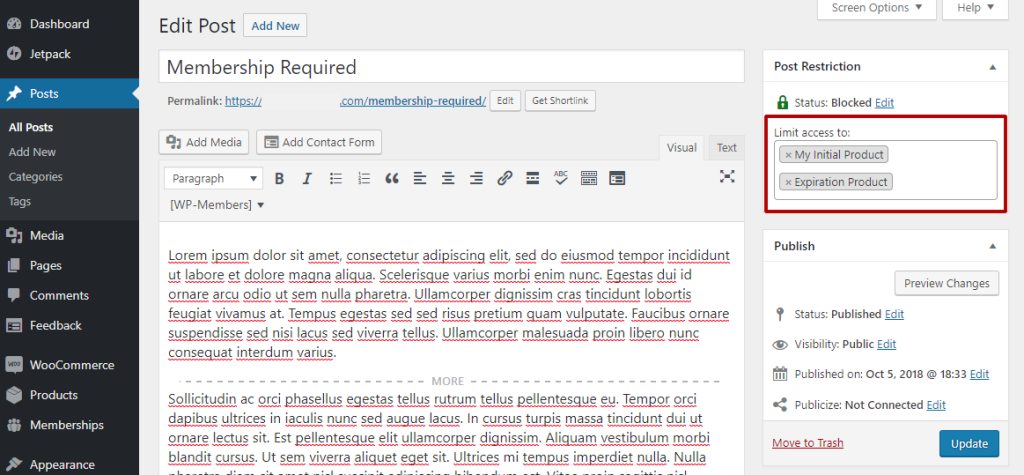
投稿や固定ページやその他のコンテンツにアクセスするためにメンバーシップが必要になるように設定するには、投稿エディターでこれを行うことができます。画面右上には WP-Membersの投稿制限メタボックスがあり、「アクセスを制限する:」オプションとその後にメンバーシップの選択肢が表示されます。 1つメンバーシップをリストに入れることも、複数のメンバーシップをリストに入れることもできます。複数のメンバーシップが割り当てられている場合、ユーザーは割り当てられたメンバーシップのうち1つに対して現在有効なメンバーシップを持っている必要があります。
原文を見る
To set a post, page, or other content to require a membership to access, you can do this in the post editor. In the upper right were the WP-Members post restriction meta box is, you will see the option to “Limit access to:” followed by a selector for memberships. You can list a single membership or you can list multiple memberships. In the case of multiple assigned memberships, the user will need to have a current and valid membership for one of the assigned memberships.
https://rocketgeek.com/plugins/wp-members/docs/membership-products/
ユーザーアクセスを管理する
ユーザーのプロフィール画面でそのユーザーのメンバーシップアクセスを手動で有効または無効にすることができます。 メンバーシップアクセスの項目にて、目的のメンバーシップで「有効化」または「無効化」を選択し、プロフィールを更新します。
アクセスを自動化したり、登録機能や他プラグインと連携したりするために、ユーザーのメンバーシップを追加または削除するための 2 つの API 関数があります。:
WP-Members はユーザーがコンテンツにアクセスしようとした時にそのユーザーがコンテンツにアクセスできるかどうかを自動的にチェックします。ただし、アプリケーションをカスタムしたり他プラグインなどと統合したりする場合は、以下の API 関数を使用してユーザーがアクセス権を持っているかどうかを確認できます。:
原文を見る
You can manually enable or disable a user’s membership access in the user’s profile. In the Product Access section, select to “Enable” or “Disable” the desired membership and update the profile.
To automate access and/or to integrate with registration or other plugins, there are two API functions for adding or removing memberships for a user:
WP-Members will automatically check to see if a user has access to content when that user tries to access. However, for custom applications and integrations, the following API function can be used to check if a user has access or not:
https://rocketgeek.com/plugins/wp-members/docs/membership-products/
メンバーシップを販売する
メンバーシップは柔軟です。 これらはカスタム投稿タイプ (CPT) として定義されているため、ユーザーへのアクセス権の割り当て方法を統合およびカスタマイズできます。

新しい WP-Members Memberships for WooCommerce 拡張機能を使用すると、WooCommerce を通じてメンバーシップを簡単に販売できます。この拡張機能を使用すると、WooCommerce 製品に WP-Members のメンバーシップをリンクできるようになります。メンバーシップが WooCommerce 製品にリンクされている場合、ユーザーがその製品を購入するとユーザーにはそのメンバーシップが割り当てられ、そのメンバーシップを必要とするように設定されたコンテンツにアクセスできるようになります。
原文を見る
Memberships are flexible. They are defined as a Custom Post Type (CPT) so you can integrate and customize how to assign access to users.
You can easily sell memberships through WooCommerce using the new WP-Members Memberships for WooCommerce extension. This extension will allow you to link a WP-Members membership in a WooCommerce product. If a membership is linked to a WooCommerce product, when the user purchases that product, the user will have that membership assigned to them and will then be able to access content set to require that membership.
https://rocketgeek.com/plugins/wp-members/docs/membership-products/
チュートリアルとコード スニペット [支援購読者のみに公開]
原文を見る
https://rocketgeek.com/plugins/wp-members/docs/membership-products/