このページではWP-Members の標準インストールに推奨される WordPress® 設定を記載しています。特定の設定については、推奨設定と一致していないとWP-Members が警告を出します。これらのWP-Members通知は、WP-Members設定でオフにすることができます。
これらは単なる「推奨」設定であることに注意してください。インストールやセットアップによってはこれらを変更する必要がある場合があります。これらが何を設定しているのか、なぜそうした設定をするのかをしっかり理解しているのであれば、他の最も適した設定を使用してもよいでしょう。
基本的なインストール、開始、およびテストには推奨設定を使用してください。
原文を見る
These are the WordPress® settings that are recommended for a standard installation of WP-Members. For certain settings, WP-Members will alert you to a setting that does not match the recommendations. These WP-Members notices can be turned off in the WP-Members settings.
It should be pointed out that these are just the “recommended” settings. There may be instances in various installations and setups where you may want or need these to be different. As long as you understand what these settings are and why they are set the way they are, then you should use whatever setting makes the most sense.
For basic installations, starting out, and for testing, use the recommended settings.
設定 > 一般
「だれでもユーザー登録ができるようにする」のチェックを外してください。
この設定でwp-login.php によるオープン登録を防止できます。
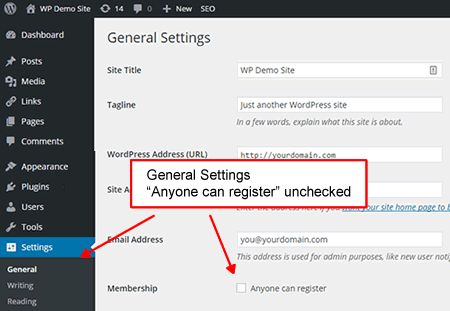
この設定にチェックが入っている場合、WP-Membersは WP-Members設定ページに通知メッセージを表示します。 この通知はオフにすることができます。
原文を見る
“Anyone can register” should be unchecked.
This setting prevents open registration via wp-login.php
If this setting is checked, WP-Members will give a notice message on the WP-Members Settings page. This notice can be turned off.
設定 > 表示設定
「フィードの各投稿に含める内容」 を「抜粋」に設定してください。
WordPress® は既定だと「全文を表示」に設定された状態でインストールされます。この場合、保護されたコンテンツが RSS フィードで閲覧できるようになってしまいます。
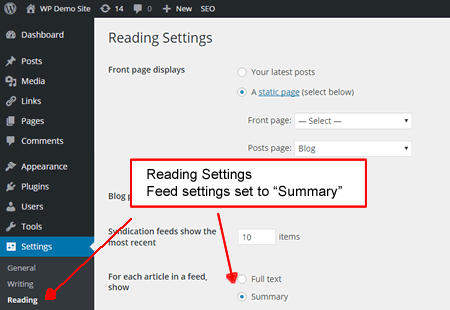
この設定にチェックが入っている場合、WP-Membersは WP-Members設定ページに通知メッセージを表示します。 この通知はオフにすることができます。
概要フィードはプラグインがコンテンツの抜粋を処理する方法と同様に、ユーザーをコンバージョン (登録) に導くティーザーコンテンツを許可するプロセスとして設計されていることに注意してください。コンテンツを完全にブロックしたい場合は、 WPのdo_feed_{$feed} フィルターかWP-Members アドバンスドオプション拡張を使ってフィード コンテンツを削除する必要があります。
原文を見る
“For each article in a feed, show” should be set to “Summary”
WordPress® installs with this defaulted to Full Text, in which case your protected content will be available in the RSS feed.
If this setting is checked, WP-Members will give a notice message on the WP-Members Settings page. This notice can be turned off.
Note that summary feeds, much like how the plugin handles content excerpts, is designed as a process to allow teaser content that leads the user to conversion (registration). If you want to completely block content, you need to eliminate feed content which you can do with either WP’s do_feed_{$feed} filter or with WP-Members Advanced Options extension.
設定 > ディスカッション
「ユーザー登録してログインしたユーザーのみコメントをつけられるようにする」にチェックを入れてください。
これによりコメントに対する保護レベルが追加されます。 もちろん、これをオープンな状態のままにすることもできます。しかしいずれにせよ未登録のユーザーは保護されたページのコメントを閲覧できません。
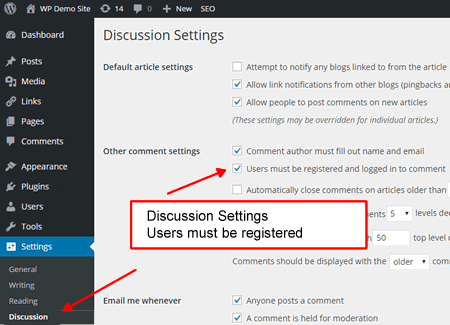
この設定にチェックが入っている場合、WP-Membersは WP-Members設定ページに通知メッセージを表示します。 この通知はオフにすることができます。
原文を見る
“Users must be registered and logged in to comment” should be checked.
This adds a level of protection to your comments. Certainly, you could leave this open, but unregistered users will be unable to view comments on protected pages anyway.
If this setting is checked, WP-Members will give a notice message on the WP-Members Settings page. This notice can be turned off.
設定 > パーマリンク
デフォルト設定(例えば example.com/?p=123)以外ならなんでもいいです。
デザインとコンテンツに莫大な金額を費やしているにもかかわらず、パーマリンクを有効に活用できていない WordPressサイトがいかに多いかは驚くべきことです。この設定はプラグインを実行するにあたって必須ではありませんが、特別なページ (ログイン、登録、ユーザー プロファイル) の使用がいくらか簡単になります。
原文を見る
Anything other than default (i.e. example.com/?p=123)
It is amazing how many installations of WordPress spend a princely sum on design and content, yet fail to make better use of permalinks. While this is optional in terms of running the plugin, it does make the use of special pages (login, register, user profile) somewhat easier.